

TABLE OF CONTENTS
WordPress Market Share Statistics
WordPress SEO Basics & Foundation
Choose the Right WordPress Hosting for SEO
Install and Configure an SSL Certificate
Check Your WordPress Visibility Settings
Choose and Install the Best WordPress SEO Plugin
Optimize Title Tags and Meta Descriptions
Structure Content with Header Tags (H1–H6)
Build a Strategic Internal Linking Structure
Optimize for Mobile (Mobile-First Indexing)
Create and Submit an XML Sitemap
Analytics, Tracking & Maintenance
Set Up Google Analytics and Search Console
Advanced WordPress SEO Strategies


Share via:
If you’ve built your website on WordPress, you’re already off to a great start. But there’s a problem: having a WordPress site alone isn’t enough.
To really get noticed in search results, you need a good WordPress SEO strategy that combines smart planning with the right tools and ongoing optimization.
Think of it like running a coffee shop: having a great location helps, but if no one knows you’re there, your shop will stay empty. WordPress gives you the location. And your SEO strategy is how you put up the signs, run promotions, and make sure Google and your audience can find you.
In this blog, we’ll break down practical WordPress SEO strategies, so your site can attract the right visitors and grow your business.
WordPress Market Share Statistics

WordPress isn’t just a tool for bloggers or small businesses anymore; it powers over 43% of all websites on the internet.
So why does this matter for your WordPress SEO strategy? The popularity of WordPress means that there’s a huge system of themes, plugins, and SEO tools designed to make your life easier. It also means Google and other search engines are extremely familiar with how WordPress sites work, which is a huge advantage when you optimize your content.
Here are a few quick facts to put things in perspective:
- WordPress holds 61.4% of the market share among (Content Management Systems) CMS-based websites, more than all other platforms combined
- There are tens of thousands of themes and over 65,000 plugins, including top SEO plugins for WordPress
- 1/3 of all online shops run on WooCommerce, WordPress’s ecommerce plugin
- WordPress has had 52 major releases and over 760 total updates, keeping it secure and competitive
Even compared to other website builders, WordPress is in a league of its own. Shopify comes next at just 4.8%, followed by Wix at 3.7% and Squarespace at 2.3%.
WordPress is global and versatile. Sites run on WordPress in every corner of the world, from the United States and Germany to India and Japan. And the platform is available in 208 languages, so your SEO strategy can reach audiences everywhere.
Some of the most well-known websites also rely on WordPress:
- Time Magazine: For high-traffic publishing
- Harvard University: For news, research, and student engagement
- Salesforce: As part of its web ecosystem
- Taylor Swift: For merch, news, and tour dates
WordPress is open source, cost-effective, user-friendly, and highly flexible. It’s easy to scale, supports almost any website type, and gives you full control over your content and hosting. All these are why WordPress is still the top choice in 2026.
What Is WordPress SEO?

WordPress SEO is the process of optimizing your website so it ranks higher in search engines, attracts more traffic, and delivers a better experience for your visitors.
The good thing is that you don’t need to be a coding wizard to do it.
It makes SEO approachable because it comes with a built-in structure that search engines understand, and it also has a system of SEO plugins for WordPress that make the process easier:
- Content optimization: Making sure your posts and pages include the right keywords, meta tags, and headings so search engines understand what your site is about
- Technical SEO: Optimizing your site’s speed, mobile responsiveness, XML sitemaps, and schema markup. WordPress makes many of these easier with WordPress SEO tools and plugins
- Site structure: Clear menus, internal linking, and clean URLs, all part of WordPress SEO best practices
- Continuous improvement: Using data from your WordPress analytics setup to refine your strategy over time
When we talk about WordPress SEO strategies, we’re referring to planning your content around the right keywords, ensuring your site is technically good, and making it easy for both users and search engines to navigate.
The beauty of WordPress is that it allows both beginners and experts to implement these strategies easily. With the right combination of plugins, settings, and tools, you can create a site that’s beautiful and also primed to rank.
WordPress SEO Basics & Foundation
You can write the best blog post in your industry, but if your site is slow, insecure, or blocked from search engines, it won’t matter.
To solve this, here are the basics you must get right.
Choose the Right WordPress Hosting for SEO
Your hosting provider affects your WordPress site speed, uptime, and overall performance. A slow website will frustrate your visitors and send negative signals to Google.
Look for hosting that’s optimized specifically for WordPress. You want one with fast servers, strong security, and good support.
Install and Configure an SSL Certificate
If your website still shows “Not Secure” in the browser bar, that’s a red flag.
An SSL certificate ensures your site runs on HTTPS instead of HTTP. Google prefers secure websites, and users trust them more. Most hosting providers offer free SSL, so there’s no reason to skip this.
Check Your WordPress Visibility Settings
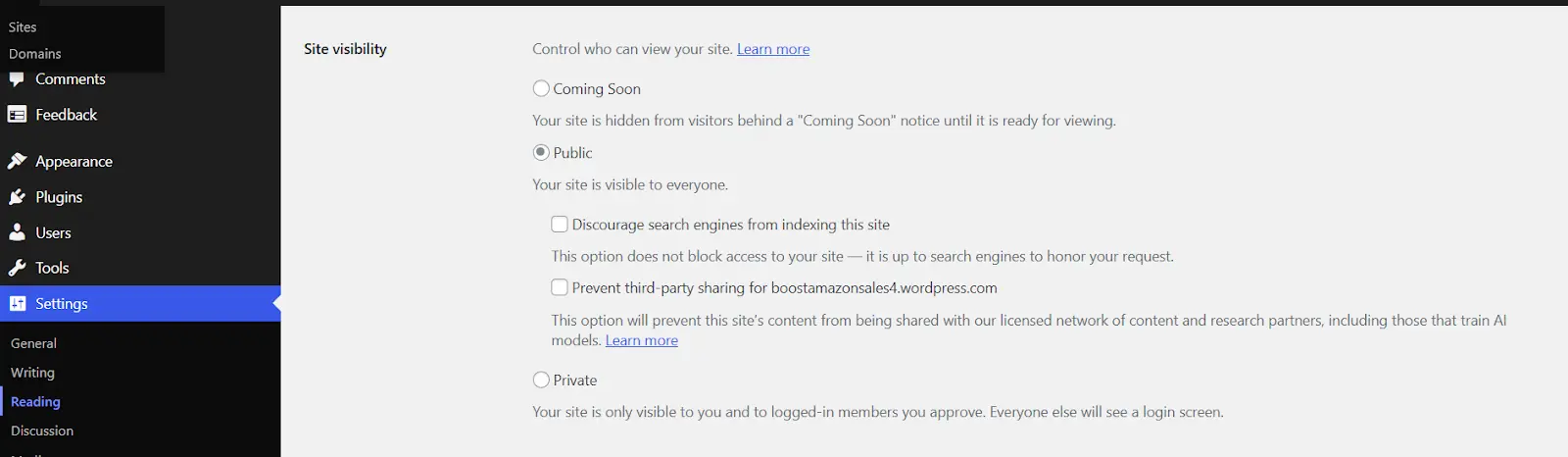
This one surprises people.
WordPress has a simple checkbox that says: “Discourage search engines from indexing this site.”
It’s helpful when you’re building a site privately. But if that box stays checked after launch? Your SEO disappears before it even starts.
Go to Settings → Reading and make sure it’s unchecked.
Choose and Install the Best WordPress SEO Plugin
Good SEO plugins for WordPress help you manage your WordPress meta tags, generate a WordPress XML sitemap, and add WordPress schema markup without touching any code.
Plugins like Yoast SEO or Rank Math guide you through your WordPress SEO settings step by step. They simplify WordPress SEO optimization, so you’re not guessing what to fix.
On-Page SEO Optimization
On-page SEO is simply what you do inside your pages and posts to help search engines understand them, and to make readers stay longer.
It’s at this stage that WordPress SEO optimization starts to show results.
Optimize Title Tags and Meta Descriptions
Your title tag is what shows up in Google’s search results. It’s your first impression.
If it’s vague or stuffed with keywords, people will scroll past it. If it’s clear and specific, they will click.
Your meta description doesn’t directly impact your rankings, but it absolutely affects your click-through rate. Think of it like the short pitch under your headline.
Most SEO plugins for WordPress let you edit these easily. They also show a preview of how your page will appear in search results, which makes it easier for you to make adjustments.
To fully implement this strategy, we recommend that you write your titles for humans first, then optimize them for search engines.
Structure Content with Header Tags (H1–H6)
Some people think that headers are just for design. Well, they’re wrong. Headers help search engines understand the structure of your page.
Your H1 should clearly state what the page is about. After that, use H2s and H3s to break up your sections logically.
Good structure improves readability. And better readability means people stay longer, which supports your overall WordPress SEO strategies.
If someone can skim your page and instantly understand what it covers, then you’re doing it right.
Optimize Images for SEO
Images make your content engaging. But unoptimized images will slow your site down.
Here’s what to focus on:
- Compress images before uploading
- Use descriptive file names
- Add alt text that explains the image naturally
Many WordPress SEO tools and performance plugins can help automate compression so you don’t have to do it manually every time.
Build a Strategic Internal Linking Structure
Internal links guide your visitors from one page to another on your website.
They also help search engines understand which pages are most important.
If you write a blog post about email marketing and you already have a guide on landing pages, link them together. Keep readers moving through your site.
Strong internal linking is one of the simplest and most effective WordPress SEO best practices, and it requires zero technical skill. It only requires your attention.
Write SEO-Optimized Content
What makes good SEO content?
- It doesn’t feel robotic
- It answers real questions
- It solves real problems
Start with a clear keyword focus. Then write naturally around it.
Avoid stuffing keywords everywhere. Instead, support your main topic with related phrases and useful explanations.
Your WordPress analytics setup will show you which pages are performing well, how long people stay on each page, and where they drop off. Use that data to refine your content over time.
Technical SEO for WordPress
Technical SEO means making sure search engines can crawl, understand, and properly index your website.
In our experience, when your WordPress technical SEO is clean, everything else will work better, your content will rank faster, your pages will load better, and search engines won’t struggle to interpret your site.
Optimize for Mobile (Mobile-First Indexing)
Google primarily looks at the mobile version of your site first. That’s what “mobile-first indexing” means.
If your website looks great on desktop but clunky on a phone, that’s a problem.
Most modern WordPress themes are responsive, but don’t assume. Test your pages on your own phone. Click around. Read your blog posts and fill out your forms from your phone.
A good WordPress SEO optimization should have a strong mobile experience, clean layouts, readable fonts, fast load times, and easy navigation.
Create and Submit an XML Sitemap
An XML sitemap is basically a roadmap of your website. It tells search engines:
- What pages exist
- When they were last updated
- Which ones are important
Most SEO plugins for WordPress automatically generate an XML sitemap for you. You don’t need to build one manually.
Once it’s created, submit it to Google Search Console. That helps search engines discover and crawl your content faster.
Optimize Your Robots.txt File
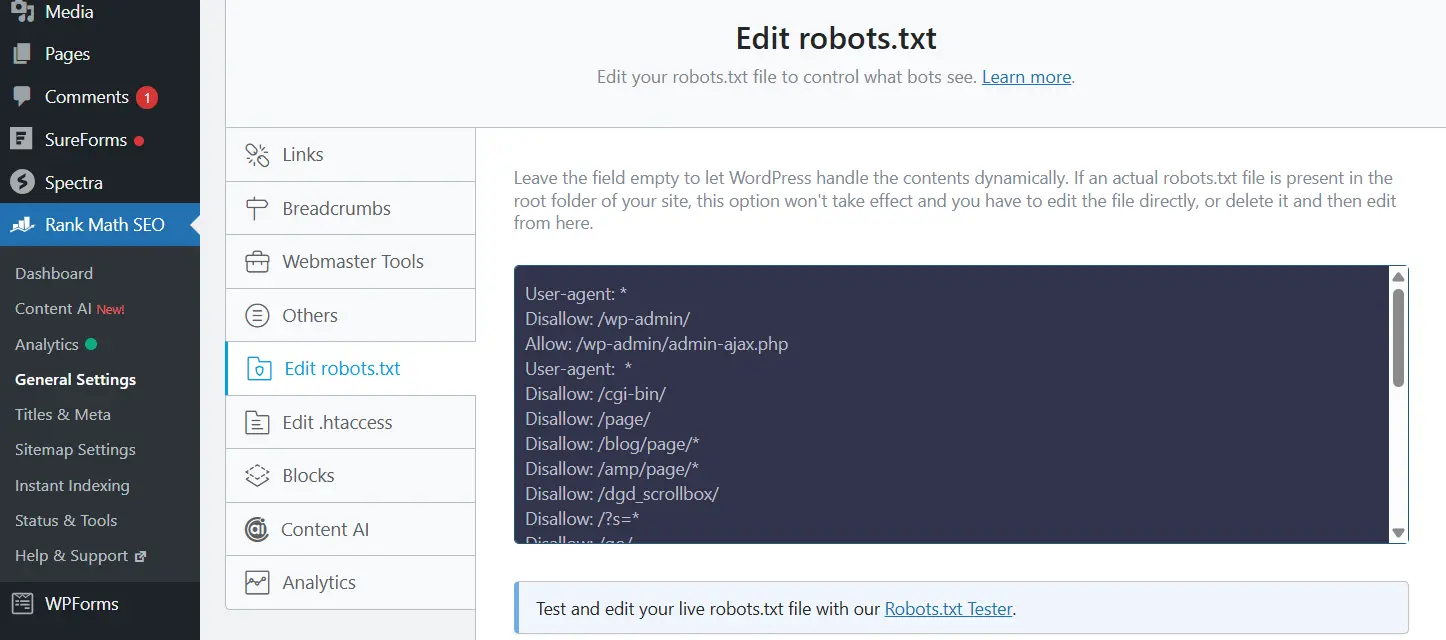
Your robots.txt file tells search engines what they can and cannot crawl.
For most websites, the default WordPress setup works fine. But if you accidentally block important pages, it can hurt your visibility.
You can edit this file in your hosting dashboard or, if your plugin allows, directly in your WordPress SEO settings.
Implement Schema Markup
Schema markup helps search engines better understand your content.
It’s what allows Google to show rich results, things like star ratings, FAQs, product prices, and breadcrumbs directly in search results.
The good news? You don’t need to hand-code it.
Most modern WordPress SEO tools and plugins allow you to add WordPress schema markup with a few clicks. You can assign schema types to blog posts, services, products, and more.
Enable Breadcrumbs
Breadcrumbs are those small navigation links you see at the top of a page:
Home > Blog > SEO > WordPress SEO Strategy
They help users understand where they are on your site. They also help search engines understand your structure.
Many SEO plugins for WordPress allow you to easily enable breadcrumbs. Once activated, they improve both navigation and crawlability.
Analytics, Tracking & Maintenance
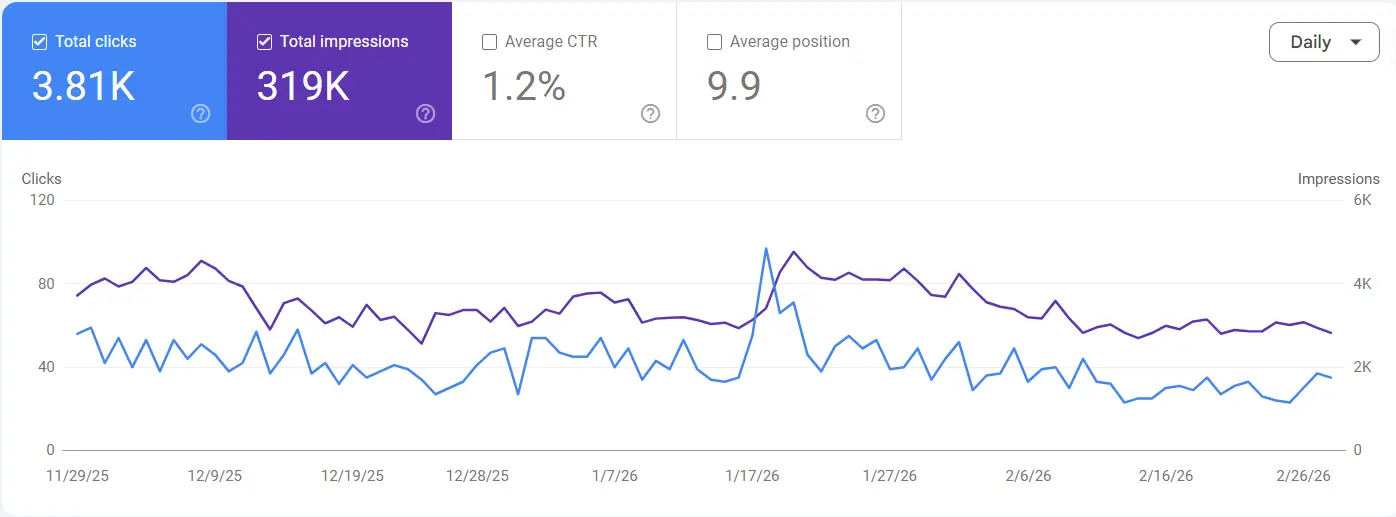
Many business owners make the mistake of setting up their site, publishing a few blog posts, installing an SEO plugin, and then just hoping that traffic shows up.
But a good WordPress SEO strategy doesn’t end after optimization. It continues with tracking, testing, and improving.
Set Up Google Analytics and Search Console
A proper WordPress analytics setup starts with two free tools:
- Google Analytics
- Google Search Console
Google Analytics shows you what visitors do on your site, how long they stay, what pages they read, and where they drop off.
Search Console shows you how Google sees your site, which keywords you rank for, which pages get impressions, and if there are any indexing issues.
Most SEO plugins for WordPress make connecting these tools simple. Some even display performance data inside your dashboard so you don’t have to jump between platforms.
When you see which pages perform well, you can improve them further. When you see pages underperforming, you will also know where to focus.
Conduct Regular SEO Audits
Think of an SEO audit like a regular health check. This means that you should review your site every few months:
- Are your WordPress meta tags properly written?
- Are old posts still optimized?
- Is your WordPress XML sitemap updated?
- Are there broken internal links?
- Is your WordPress site speed still strong?
- Does your WordPress mobile optimization still hold up?
You can use different WordPress SEO tools to scan your site and flag issues. Many plugins highlight missing meta descriptions, weak headings, or schema gaps.
This is also where you revisit your WordPress SEO settings. Make sure nothing important has been accidentally changed or disabled.
Advanced WordPress SEO Strategies

Once your foundation is strong and your tracking is in place, you start gaining an edge. It’s at this stage that you progress to advanced WordPress SEO strategies.
Optimize for Featured Snippets
When you search for something, Google shows a box with an answer at the top of the page. That’s a featured snippet.
If you land there, you jump above the traditional rankings. And that visibility can give you great traffic.
Here’s how to improve your chances:
- Answer specific questions clearly and directly
- Use structured headings (especially H2 and H3)
- Add short, concise summaries under question-based headings
- Use bullet points or numbered lists when appropriate
Also, implementing proper WordPress schema markup increases your chances of getting good results. Many WordPress SEO plugins let you add FAQ or article schema without any coding.
Prepare for AI Search (GEO)
We’re moving beyond traditional blue links into AI-generated answers, summaries, and conversational results. Some call this Generative Engine Optimization (GEO).
What does that mean for your WordPress SEO strategy?
It means your content needs to be:
- Clear
- Structured
- Authoritative
- Context-rich
AI-driven search systems pull information from well-organized, trustworthy content. Pages with strong headings, clear explanations, and a logical flow perform better.
This is where proper WordPress SEO optimization becomes even more important:
- Clean WordPress meta tags
- Accurate schema
- Strong internal linking
- Fast loading speed
- Solid mobile experience
Your WordPress analytics setup will also help you monitor how search behaviour changes over time. If you notice changes in traffic sources or keyword patterns, adjust your content accordingly.
Wrapping Up
WordPress continues to power over 43% of the web because it’s flexible, scalable, and built to grow with you. But you should know that growth doesn’t happen automatically. It happens when you apply the right WordPress SEO strategies consistently.
If you focus on clarity, structure, speed, and usefulness, you’ll build authority and a sustainable brand.
FAQs
1. Is WordPress good for SEO?
Yes.
WordPress is SEO-friendly because it supports clean URLs, customizable WordPress meta tags, easy content structuring, and great plugins. With the right WordPress SEO strategy, you can optimize everything from technical settings to on-page content without needing custom development.
2. Do I need coding knowledge for WordPress SEO?
No.
Most WordPress SEO optimization tasks can be handled with WordPress SEO plugins like Yoast or Rank Math. They guide you through key WordPress SEO settings, generate sitemaps, manage schema, and help optimize pages.
3. Is WordPress still popular in 2026?
Very much so.
WordPress powers over 43% of all websites and holds more than 60% market share among CMS platforms. It remains the most widely used content management system globally because it’s flexible, scalable, and constantly evolving.
4. How do I track my WordPress SEO performance?
Start with a proper WordPress analytics setup.
Connect your site to Google Analytics and Google Search Console. These tools show you traffic trends, keyword rankings, click-through rates, and indexing issues.
Many WordPress SEO tools allow you to integrate analytics directly into your dashboard, so you can monitor performance and refine your strategy over time.
SEO improves when you measure it.
5. Does Google prefer WordPress?
Google doesn’t prefer a platform. It prefers well-optimized websites.
That said, WordPress makes it easier to follow WordPress SEO best practices, clean structure, mobile responsiveness, fast loading speeds, and structured data. When configured correctly, WordPress aligns very well with what search engines look for.
6. When not to use WordPress?
WordPress works for most websites, blogs, business sites, ecommerce, portfolios, and even complex content platforms.
However, if you’re building a highly custom web application that requires deep backend engineering, or a platform that isn’t content-driven at all, another framework may be more suitable.
For the majority of businesses focused on visibility, content, and growth, WordPress remains a strong long-term choice.

.svg)

.avif)

.svg)